Print Saudi cheques without manual writing errors.
Choose your Saudi bank, enter cheque details, preview the cheque, then print on your real cheque paper. Data stays on your computer; internet is required only for activation.
28/04/2026
28/04/2026
28/04/2026

See cheque printing in seconds.
Watch how Cheque Plus turns cheque details into a clean preview and a ready-to-print result.
Run cheque operations with a cleaner workflow.
Prepare cheque details, preview the cheque, manage history, and keep everything organized in one desktop experience built for Saudi businesses.

 Al Rajhi Bank
 Saudi National Bank
 Riyad Bank
 Saudi Awwal Bank
 Alinma Bank
 Bank Albilad
 Bank AlJazira
 Arab National Bank
 Saudi Investment Bank
 Banque Saudi Fransi
 Gulf International Bank Saudi
 Emirates NBD Saudi Arabia
 QNB Saudi Arabia
 KFH Saudi Arabia
How it works
A clear process for accountants and business owners.
Select bank
Choose from available Saudi bank templates.
Enter details
Payee, amount, date, account, and notes.
Preview cheque
Most templates are ready to use. If your printer needs fine-tuning, adjust the template once and reuse it for future cheques.
Print & save
Print and keep a searchable cheque history.
Built for cheque work
Focused features that help you prepare cheques quickly.
Bank templates
Includes most Saudi banks with ready cheque templates.
Multi-company
Manage different companies, accounts, and cheque books.
Cheque history
Advanced search and filters for previous cheques.
Inventory alerts
Warnings when cheque leaves are running low.
LAN sharing
Share data between devices on your local network.
Automatic backups
Daily, weekly, or preferred backup schedule.
Saudi bank templates, ready to use.
Most templates are ready to use. If your printer needs fine-tuning, adjust the template once and reuse it for future cheques.
Setup available online or on-site.
We can help you install the software, choose your bank template, and print a test cheque.
- Installation and activation guidance
- Bank template selection
- Test print on your cheque paper
- Basic training for your team
Why Cheque Plus Saudi?
A focused Windows tool for businesses that still print real Saudi bank cheques.
Print on real cheque paper
Preview the cheque layout and print directly on the bank cheque leaf.
Save cheque history
Keep a searchable record of issued cheques for future reference.
Multi-company management
Manage multiple companies, accounts, and cheque books from one app.
Works offline
Your data stays local. Internet is required only for activation.

Everything included for cheque work.
A complete desktop workflow for preparing, previewing, printing, saving, and managing Saudi cheques with local data control.
Cheque printing
- Print on real bank cheque paper
- Cheque preview before printing
- Printer setup support
- Crossed cheque option
Saudi bank templates
- Most Saudi bank templates included
- Custom bank template on request
- Reusable cheque templates
- Template setup assistance available
Companies & accounts
- Multi-company management
- Accounts and cheque books
- Cheque inventory tracking
- Low cheque leaves alerts
History & reminders
- Cheque history saving
- Advanced search and filters
- Post-dated cheque reminders
- Status tracking for records
Data & backup
- Local data storage
- Works offline after activation
- Automatic backups
- LAN sharing between devices
Languages & support
- Arabic / English / French interface
- Amount to words in three languages
- 30-day free trial
- Online or on-site setup support
Trusted by cheque printing teams
Feedback from teams using Cheque Plus to prepare and print cheques more confidently.
“We prepared cheques faster and reduced manual writing mistakes.”
“The cheque preview and setup help made printing much easier.”
“Keeping cheque history and company records in one place is very useful.”
Frequently asked questions
Quick answers for Saudi customers before downloading or booking a demo.
Does it work on Windows 10 and Windows 11?
Yes. Cheque Plus Saudi is designed for Windows desktop use on Windows 10 and Windows 11.
Does it work offline?
Yes. The app works offline after activation. Internet is only required for activation and license checks.
Can you add my bank if it is missing?
Yes. A custom bank template can be added upon request when you provide the cheque size and a clear sample.
Is my data stored online?
No. Your cheque data is stored locally on your device unless you choose to share it on your local network.
Do I need a special printer?
No special printer is required. The software is designed to work with most standard printers that can feed cheque paper correctly.
Can I try before paying?
Yes. You can download the free trial and test the cheque workflow before activation.
Real product photos
See the software interface and a real printed cheque result from the workflow.
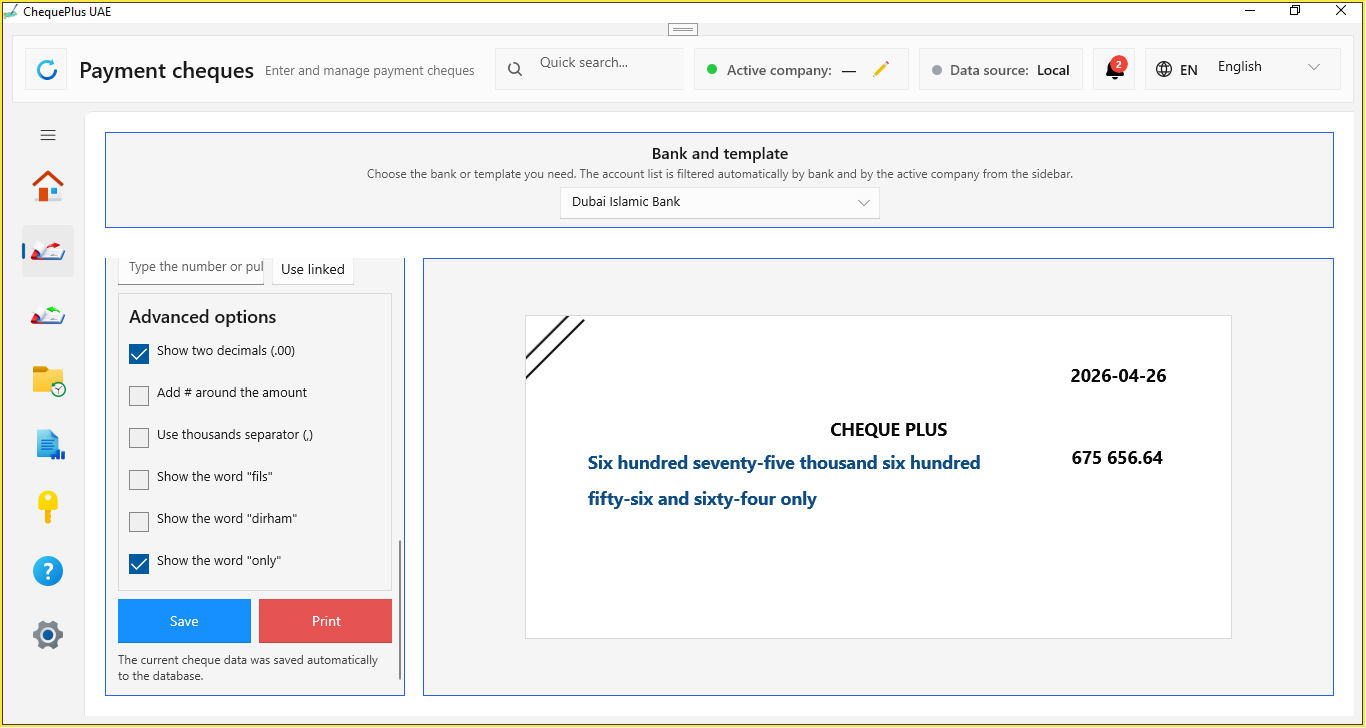
Software interface
Actual cheque editor, bank template selector, preview area, and history workflow.
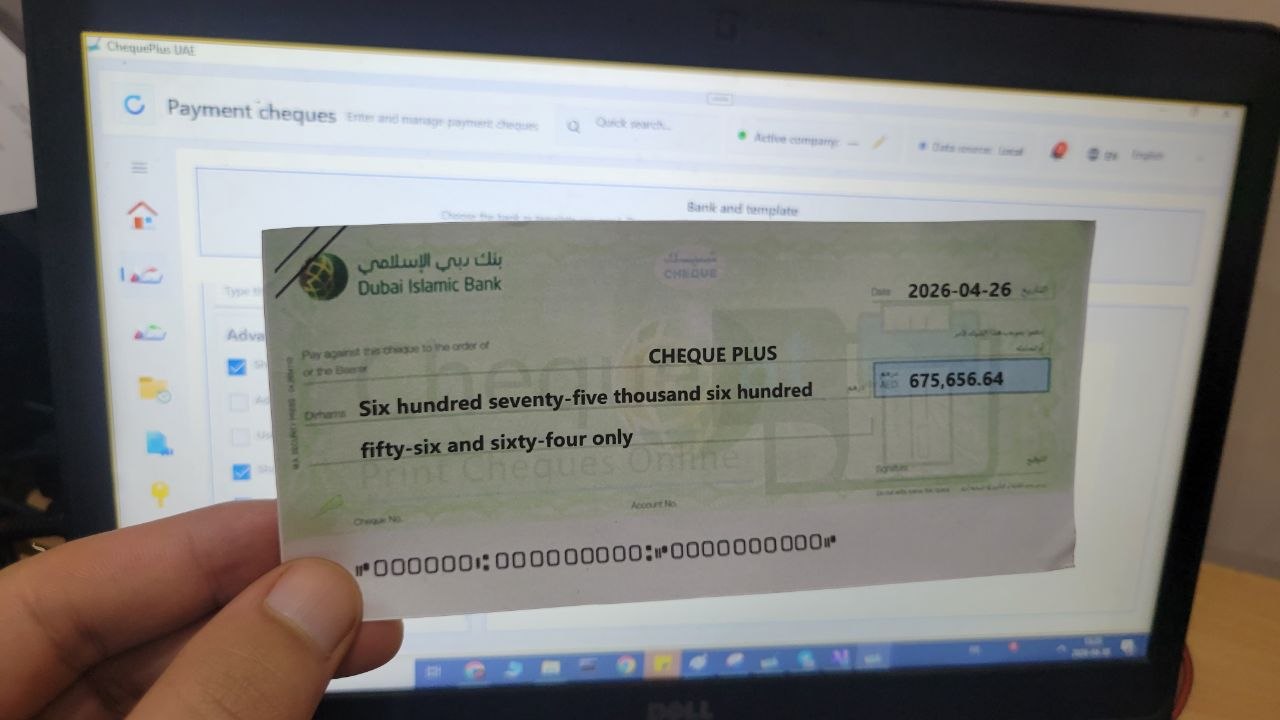
Printed cheque result
A real printed cheque sample prepared with Cheque Plus.
Clear plans for your usage period
Choose the period that fits your business. Every plan includes software use, support, and updates throughout the selected period.
1 Month
A simple option for temporary use or a short paid start.
- Use the software on 2 devices
- Manage up to 3 companies
- Local sharing between devices
- Backups and cheque history
- Support and updates during the month
1 Year
The practical choice for most accountants and small businesses.
- Use the software on 2 devices
- Manage up to 3 companies
- Local sharing between devices
- Backups and cheque history
- Cheque book alerts and post-dated cheque reminders
- Support and updates during the full year
3 Years
The best long-term option for businesses that want more value and longer support.
- Use the software on 2 devices
- Manage up to 3 companies
- Local sharing between devices
- Backups and cheque history
- Cheque book alerts and post-dated cheque reminders
- Support and updates during 3 years
- Best value for companies and accounting offices
The 30-day trial is available from the download button at the top of the page. Every plan includes support and updates during the selected period.
Need help setting it up?
Book an online demo. On-site installation may be available depending on city and availability.
Saudi cheque printing software for Windows
Cheque Plus Saudi is cheque printing software for Saudi businesses, accountants, finance teams, and business owners who need to print bank cheques accurately on real cheque paper.
Features include Saudi bank cheque templates, cheque preview, cheque history, advanced filters, multi-company management, local data storage, backups, LAN sharing, Arabic, English, and French interface, and amount to words conversion.